GeoCareer Finder: Interactive GIS Job Platform
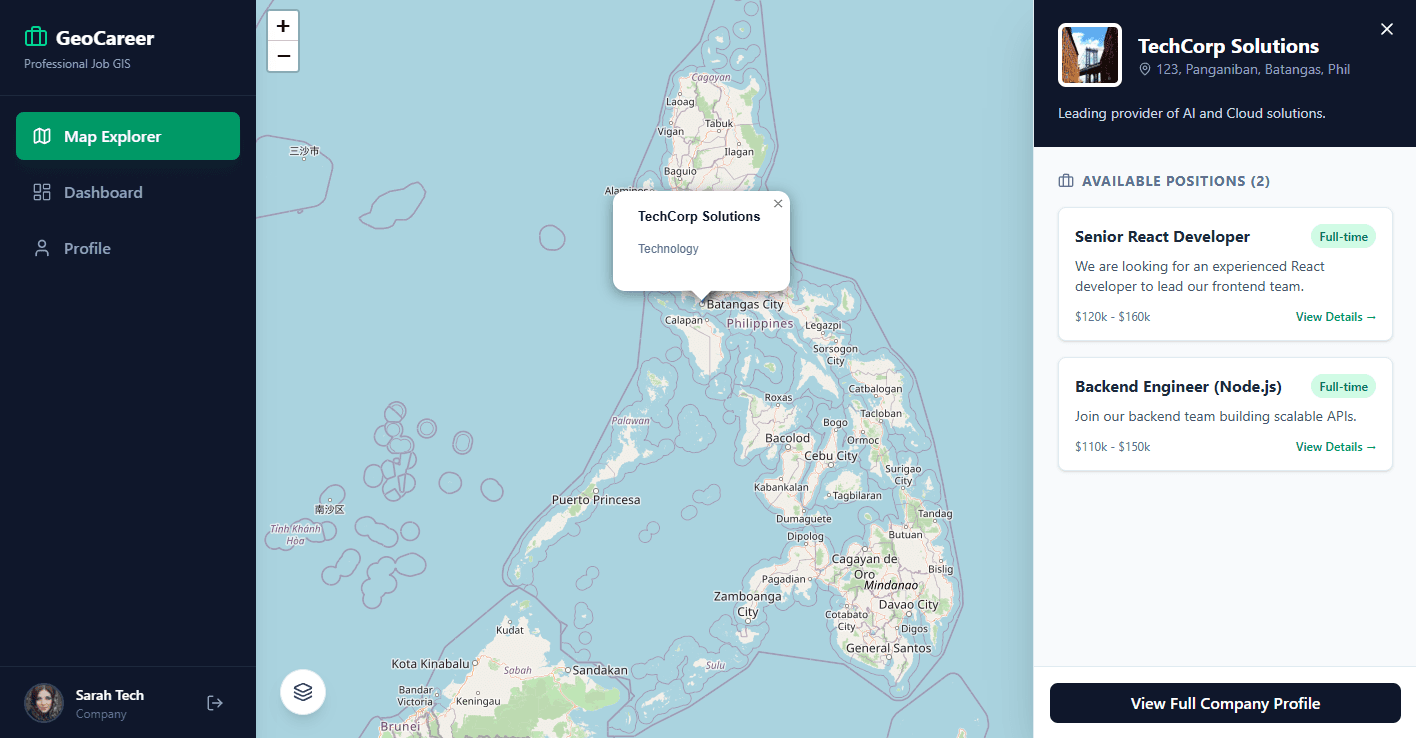
An advanced interactive job finder app leveraging a professional-grade GIS map for location-based job exploration, featuring detailed company profiles and a multi-role access system.
ReactNode.jsPostgreSQLGISMapping APIPostGISAuthenticationFull-StackGeoSpatial
GeoCareer Finder: Interactive GIS Job Platform
Overview
The GeoCareer Finder is an advanced and interactive job finding application designed to revolutionize the job search experience. It leverages a professional-grade interactive GIS map, allowing users to visually explore job opportunities based on company locations. Companies post their hiring positions, which are then displayed as interactive cards on the map when their location is clicked. This platform caters to three distinct user roles: App Administrators, Company Owners/Managers/Recruiters, and Applicants, each with tailored functionalities.
Tech Stack
Challenges
Learnings
Development Roadmap
Phase 1
Phase 1: Core GIS Map Integration and Basic Job Display
Phase 2
Phase 2: Company Profile Management and Job Posting Module
Phase 3
Phase 3: Applicant Module and Application Workflow
Phase 4
Phase 4: Multi-Role Access Control and Admin Panel
Phase 5
Phase 5: Advanced Search, Filtering, and Performance Optimization
Phase 6
Phase 6: Deployment and Continuous Integration